Project 2 user testing and final presentation

We have started to wrap things up on our project. Unfortunately the process are a bit sluggish and still there is a lot of parallel work. A very limited amount of user testing has been made. The design was tested with two children one 6 year old and a 13 year old. One of the tests were made directly by one of our group member and the other one tested with help of one parent that received the instructions from me. In normal case we would be more active in engaging with users during this stage but as we are limited in meeting people during these (virus) it becomes hard to reach out to people and collect insights. It is not an excuse just a clarification why only two tests were made.

So the choice to do testing with children is that the app should be understandable by children. The lower limit age is not defined but we have to go with a presumption that kids from 6-7 year can handle a smartphone. Reasoning behind starting to do user test with kids is that the design can be complicated to understand for them. Rather than making things to complicated from the start we as a group felt like it would be easier to start with a “simple design” and build up on it with additional layers of visual design and functions as the process continues.

The result of the test with a 6 year old gave us a hint that the icons in figure 1 were not as explanatory. From the overview screen they do not say much about what they mean. Pressing the buttons reveals details with a text describing what to do. The 13-year old seemed to understand the logic behind the icons as symbols but requested that maybe the icons to be texted underneath.
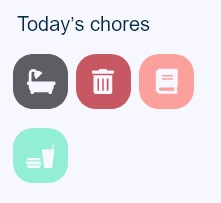
Figure 1. Icons

The insight gained from the two users seemed to be that they understand what the icons represent but don’t know what kind of chore and the details surrounding the chore would be. A solution to this insight would be the accompany the icon with text underneath it or maybe make the icon bigger and add the text on the icon. Since every icon is coupled with one static task we find it that we have to have more data before making tweaks on it. The cognitive load in remembering what 4 icons are meaning doesn’t seem that high and both users did understand what the meaning was when they pressed the icon and read the instruction. Unfortunately further user testing was not made. A further visual design polish was made to final visual design.

After we presented the project critic was received on the very limited user testing, the limited engagement with others in the early stages of the project. An example of engagement with others would be to ask parents before starting the digital prototype if the proposed design makes sense and if it presents any usefulness. I totally agree with the feedback given to us. There was to little engagement with others and so the final product is based on what we as a group think is useful. Verifying our design with other users would make our work more credible and robust for real-world usage. Arguing for the design choices we made were with other words useless other than from a technical stand point. Although iterations were made on the prototype, it was not made with the backing support of users thoughts and recommendations. It was purely a technical design iteration phase done by us in the group.

As a designer the last thing to do is to be isolated in the process and design from a very limited perspective. It is a huge drawback as the very core in designing is to create for others, solve problems and meet their criteria and needs. Needless to say the project could have been executed far better…
Digital tools and project 2 progress

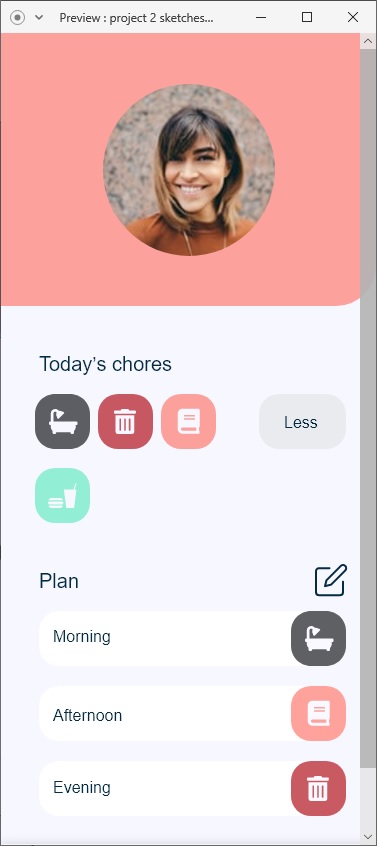
We are continuing with the project 2 by applying the feedback we got from crit session 4. Everything regarding the digital prototype is moved to the groups shared folder on Adobe xD. We will shortly start to evaluate the design decisions by engaging with other users as well. Right now we are looking to try out the design with kids in the age group 7-16 and also parents in any age group.

The specific outlines for the visual design is also set, the aim is to use light colors and obvious icons and symbols. We want to give the user a clean design and fast enough so that the admin/parent doesn’t have to spend unnecessary time navigating around the app to set up a simple task for their family member. There is consensus in the group that less is more, especially in this design where the design should fit a variety age groups and people with different technical app-knowledge. We find it more viable to add features and fancier visual design gradually as we conduct the user testing and listen to the feedback.

Figure 1. An early draft of the design

One of the last lectures of the course was a workshop in digital tools. Looked forward to this workshop but it was cancelled, so we got some very good instructions and links to resources to good tool for fast digital prototypes. Among those tools were adobe XD. Actually a lot of the resources were guides on functions of adobe XD. As I have used XD in previously courses I’m going to stick with it and develop my skills further in it. Some new things introduced (for me) is UI-kit, design system and plugins. Design system is a broader term and it isn’t usable where we are in our project. It’s a holistic approach to system design, and more viable if we had more time on our hands and a bigger project. For now UI-kits and various plugins are going to do fulfill our needs perfectly.

What makes UI-kits and plugins great is that many designs and forms are already done and ready to be used, of course with a bit of personalization and tweaking. The outcome is a design that takes less time to do. Countless of elements are ready to use. It’s just a matter of downloading the UI-kit and applying the desired elements to the product.

UI-kits and plugins directly correlate to efficient time management as the core activity in this project should be engaging with users and collecting data about the design. Other activities could also get more attention if one process becomes more efficient. For me as a designer clever and effective tools are always appreciated and welcome to join my army of tools.

Reading my previous post a bit back when I had the API project, I expressed my thoughts of highly technical tools which has a steep learning curve. JavaScript and an additional library was examined as prototyping tool. Looking back on that experience, what could be achieved and the time it took to do that quality is ridiculous compared to Adobe XD with UI-kit and plugins. There is no contest, at least for my liking. Some might prefer programming and find it more valuable practice than dragging and dropping but I believe for rapid prototyping practices that tools like Adobe XD will perform better.

Project 2 crit 4 and progress

As of 16/3 we have gotten some new guidelines on how to work with our project. Because of the outbreak of covid-19 all physical meetups with the group are postponed until further notice. This means that all work will be done online and no physical prototype will be viable, as we can’t use the workshop. This is a huge turn around for the project process as we planned to do physical/digital prototype (a hybrid but with more emphasis on the physical part of product). Not to mention the planing and the loss in the interaction in meeting team members face to face and discussing the work.

So we have moved over completely to a digital prototype. Revised concept outlines were made and some sketches were presented on the crit session 4 which was done online. To be completely honest I can’t say the project work was going as I imagined it to. We applied a system we used before, dividing the different chores between us in order to achieve more and work efficiently. The work ended up being a bit scattered as every member started to implement their own vision in the work. It can be concluded that we should have checked each others work continually over the days we designing. Just to give that second opinion and to keep each other on one path. The announcement to work 100% online took us a bit by surprise and I think that we as group underestimated the importance of meeting regularly and often as online meetings are bit more casual and loosely held. An organised agenda and a fixed time schedule for every day surely would solve these problems above. Doing mini-presentation for each other and giving critique on the work would strengthen the quality and ensure we all took the same path, design wise. Not enough experience in working with project (completely) online and stress of the current pandemic in the country is definitely underlying issues which hindered good project progress.

After the crit session we got some constructive and technical feedback, but overall got a big hit on our core concept as being a bit scattered and flimsy. Which it most absolutely shouldn’t be at this time and stage. We really took the feedback to heart and reorganized. The plan is to work ship out a first prototype to test with users (both grown ups and kids). Gain insights from that session and reiterate the prototype and retest it.

Previously the team had done some light testing with a physical prototype (high-five hand). The insights were noted but unfortunately not usable where we stand today. As we will continue developing the app, we will most likely use an button or slide action to indicate the chore is done.

Project 2 insights and prototyping

So the plan was to start the physical prototype in the workshop on 13/3. Unfortunately some members of the group felt ill and couldn’t attend. So we did postpone the meeting but decided to create some quick paper prototypes from home. The task is to try out the meaningfulness in doing a chore and then high-fiving a paper/cardboard hand when the chore is done.

Figure 1. A boring chore

So the insights gained here is that it feels viable. The process of doing some chore and then going to “the hand” to claim the reward. Although no reward mechanism is implemented I can sort of visualize it working. It could be an achievement showing on the app or unlocking time to do some thing more “fun” for the user. The group see a huge potential in developing this feature further, specifically for children. It would be a way to include them in the household and make them feel like they participate, at the same time while the have some incentive to do the boring chores.

figure 2. The high-five hand

So as a physical prototype a lot of things are missing, mostly the tactile feel of using it. Doing the function digitally would look very different as you don’t necessarily need your whole palm to make contact but it can surely be configured that way. As of this moment we are keeping the options open to both digital and physical manifestation (or a mix of both) of the prototype. The focus right now is to meet up in the workshop on Monday to build and test our prototype.

Far more specifics can be chiseled out from this crude prototype in figure 2. Using my hand as an example I know for sure that it is bigger than the average hand. Possible solution to this issue is to maybe design a GUI element that represent the a high-five interaction. If a physical size needs to be determined it would be wise to do a smaller hand and something that doesn’t look so crude and clumsy. A digital high-five will also have to be designed appropriate to the screen. Doing a quick test on my smartphone which has a 5.5 inch screen reveals that a high-five as an interaction not only looks stupid but also physically is cumbersome. As we will try out prototyping the design on the smartphone, certainly other actions and designs will be more viable. I’m leaning towards some function were the user slides an icon or a press and hold action to indicate the chore is done. The important part is to make the action memorable and not “fast” as checking a tick in square or simply taping a button. We feel that it is appropriate to tax the users cognitive load a bit in this case but we also want to achieve the feel like the app is worth doing that. Some kind of reward will have to be implemented in order to keep the retain user attention. Especially for kids whom has a short attention span.

Beyond the norm and project 2 progress

In this post I discuss the material for the lecture we had on Monday(PowerPoint material) and associated paper. The article is called Alternatives: Exploring Information Appliances through Conceptual Design Proposals. Beginning with the article which is written roughly 20 years ago, we are presented in the introduction about the possibilities of the future of digital technology. The authors argue that the increasing demand in technology and a variety of forms and function within it’s entity are going to force it to expand outside of traditional shell we (they) knew as personal computer. Which more or less dominated this field at the tame.

Another important term for the emerging devices with interactive function and connectivity is information appliances. First coined by Jef Raskin around year 1979 and further explained by Don Norman in his book “The invisible computer”. The importance of the word information appliances is evident as it clarifies and explains the specifics. As opposed to a traditional PC, information appliance is single application device (a device designed to be used for one application or similar tasks) which is easy to use. It is also able to share information automatically with other (not limited to) information appliance devices. The connectivity and communication capability between devices creates new affordances for interaction.

The authors continue to provide some examples of information appliances and what is not. In conclusion there is a lot of devices that are in the middle in between of being IA-device and not being defined as one. Of course this article being published in year 2000 doesn’t really correspond with the reality of today. Devices has been developed far beyond from what we could imagine in the beginning of the millennia. But one thing that is interesting and that still is persistent to this day is although the level of complexity and interactive value has increased, a good design has to care for what it is being designed for and for who and evidently what kind of value it should provide to it’s user.

Alternative values and how we see the product is also interesting. The authors explains that that different outcomes can be achieved depending on what kind of values are desired. Apparently the trend being at that time that many devices adopted the attributes from other devices from the field of professional work where efficiency and productivity is of core essence. Examples are not being made of how much the market was dominated by these devices but I can imagine it being very mixed. Exploration in the field of non-productive products, more leaning toward what we could call today entertainment had also an important period of development. However other values were not pursued at that time leaving a huge desire for product with alternative values other than productivity, efficiency and leisure.

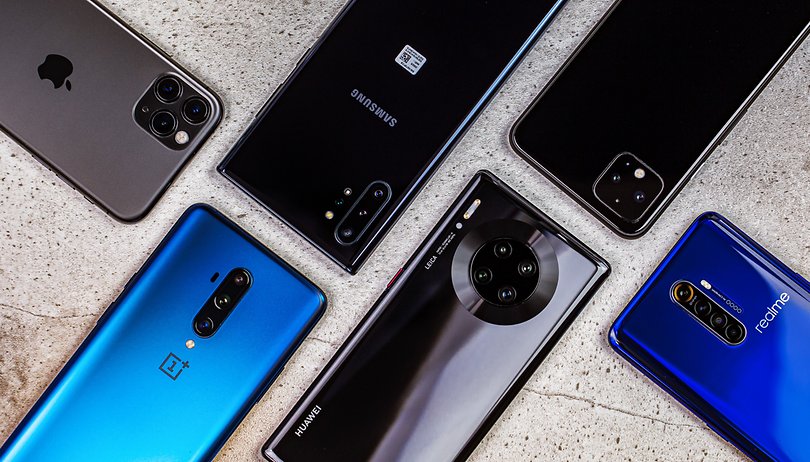
This issue or rather way of choosing values to implement is a bit of a fuzzy term today. Where the technology has pushed both in cost and technological development, products can often be found with simply “too much”. Yielding a product which will be used a X amount time before rapidly loosing it’s value. Not because times are changing and new desires needs to be addressed but because the values of the product possibly has been misjudged by the user or cleverly hidden by designer/company (in order to sell the product). An example of this phenomenon can be applied to smartphones. Where people often exchange their working and perfectly functional smartphone to a newer model. The “upgrade” is often happening before the usable life of the phone is exhausted, according to personal experience with people in my surrounding within 1-2 years. What incites this behavior? Has values been increased? While it is very much possible that with every generation of smartphone new values are added but there seem to be no relation between value and retainability since the smartphone is being exchanged before it’s values being surpassed.

Figure 1. Camera wars

During the lifespan of the smartphone device we have seen manufacturers fight over who has the best device. Depending on the technological breakout for the year, different values are directed towards the user as “must need features”. To take an example, the trend today is multiple camera modules with an astronomical amount of pixel resolution. Possible user values is that you can now take better looking pictures then ever. So they claim. But would you really think to use the smartphone as a camera if you wanted to take pictures that really meant a lot? Personal pictures like birthdays, weddings and so on have a special meaning. The value given with a smartphone as to take “good” pictures will not seem to be enough. Those precious moments where quality is of essence the user will seek to use the device with highest possible quality. In this case that would be a DSLR camera.

To tie together the article with real life observation, values is an important area but tends to shift constantly with what is trendy and what is possible technology-wise. Occasionally it seems that it is so easy as a designer to listen to the users and demography after what is sought after and start creating to that specification. Other times I would guess is were you as a designer create a need of your product, whether it is useful or not.

Project 2 is going according to schedule. Right now are we as a group working separate with our tasks. The point with working parallel is to do more efficiently and then meet up and summarize the work together, sift through, add and remove information and so on. The work so far includes a physical button shaped like a hand. Where the user shall touch/grab when a chore is done, which in turn sends a signal to the app. The specifics are more or less set and we are ready to start the physical prototype the upcoming days.

More on UbiComp and project 2 progress

Went through an interesting paper about ubiquitous computing. “Charting Past, Present and Future research in Ubiquitous Computing” is the paper called. The paper focuses and discusses 3 different themes surrounding the Ubiquitous field. Natural interfaces, context-aware and automated capture/record of experiences.

With natural interfaces traditional way of interaction with ubiquitous systems are being challenged. Challenged in a way that the user can communicate more efficiently and naturally with the system. Natural actions are already present when humans communicate, its just a matter if interpreting those actions and implementing them. Breaking the traditional mouse and keyboard as a means to send input, is that natural communication (handwriting, speech and gestures) is praised for their learn-ability and ease of use. Since it comprehends the natural abilities pf how people communicate, several different groups are being included in the first hand development rather than being developed for after initial success have been reached. Disabled people and similar groups of people that have problems using traditional input devices can benefit from natural interfaces.

The authors argues that speech-related interfaces and the emerging area of perceptual interfaces has been in the works for quite some time and are indirectly driven by research within the field of computer vision and computational perception. “Pen computing” has also seen new resurgence in the portable device since it’s initial release days as PDA. It is now more commonly found in the form of a tablet. The development seems to be driven in a more complex way than before, hardware really isn’t the limiting factor anymore.

The article goes swiftly through natural data types and how it has to become the pinnacle of interactive system development as well as error-prone interaction. Basically, achieving a perfect error recognition is impossible. It is being explained rather brief in order to leave more space to discuss about context and context aware computing. Here context is becoming increasingly complex issue, Context are not just position and identity but a myriad of identifiable “information-areas” within the field of context. The point of driving a more complex context recognition is to enhance the interaction in a more deeper and meaningful way for the user.

Where that leaves us as designer is in a exciting position, where tools and information are readily available. And now more then ever is the technology cheap enough that we think: “why not?”. Still there is some challenges left to solve as presented in the article, but if we put that aside. The power that IoT is presenting is more possibilities than limitations. It is almost that it is tempting and worth to start thinking the other way around when we design. How might we incorporate connectivity into a design idea? How do we create user value around this theme that is inevitable? A lot of exciting technology is being developed in this area and I can only imagine that we will get closer to a more natural way of interacting with devices and software.

Regarding the project 2 work, it’s going slowly. Members being sick on and off has proven it a bit hard to cooperate and in the midst of the corona outbreak makes it even harder to meet up. There is always a balancing act between taking the risk or playing it safe. We are going to try to meet up in the week and produce some good material. So far we have gotten feedback from crit-session 3. Feedback was good although our prototyping progress could have been more developed. The aim is to finalize some loose ends during the coming week and start to “build” in the workshop.

Connectivity and project 2 work

Had an interesting workshop/lecture about connectivity. Where we would learn how to connect, use and control the arduino via a web interface. What is needed is several components but noticeably Node.js and Johnny-Five would serve as core software components. Johnny-five is a framework suited to control the arduino. Johnny-five is a well documented project and has tons of basic example code on the project site which is very useful when trying to do something quick and fast.

Provided for the lecture was a mini project from instructables, which I found enough to get started in a good way and get a feel for the different components. It comes with some caveats but overall when you have familiarized yourself with it, it could come really in handy when designing prototypes. Basically the function of connecting and using the arduino over the internet gives it additional usability. For that additional function it doesn’t seem to require that much extra work (In comparison with using a specific JavaScript library to model a prototype…), and it sure could pay of a whole lot more.

As I previously stated in my post about IoT, giving the device capability to be controlled via internet doesn’t necessarily yield in higher usability factor, maybe the way we make the interaction becomes a more complex question. But then again the capabilities of interactions via internet isn’t always going to yield a positive experience. What happens when there is no service and device needs to be controlled, does it become useless at that point? How much security will have to be implemented into the device in order for the user to feel secure and have a peace of mind? I can argue a lot against making every gadget “IoT-certified” but as to play around in a quick prototype environment I find arduino and related software components (johhny five, node.js etc) to work very nicely. At end of the day security aspects aren’t really an issue that we (interaction) designers think much of. That’s left for the software developers within the design team, I would guess.

Questions we try to make sense of would, in this case, be rather, is internet enabling the user to use the product in a different way. Is it positive or negative and what happens with those values when the internet function is disabled? As previously mentioned, creating products with internet connectivity is cheap, it’s just a matter of finding the right use for the function.

Haven’t had any real physical meetings with my group the last week. Since I’ve been sick with (traditional) flu. Finally managed to shake of the fewer after being offline for 5 days. What I have missed is roughly the whole Milestone 2 work. I will re-update myself with the new information as soon as we have new group meeting. As I couldn’t develop my concept, I left it to my teammates to iterate and develop any further. The concepts was based around shared custody and problems in communicating between the custodians.

Project 2 and M1

Started with a new group project, Project 2. The theme of the research is “fringe communication” and the orientation we choose as a group is “family”. We are expected to dive into the later stages of the design process. Design process method is based on the second diamond in the “double diamond”-process. Focus will be on developing potential solutions and delivering solutions.

The first milestone is done, with a mixed feedback. Goals for this milestone was to open up the field research within the area and present potential concepts. 5 rough concepts were presented. Feedback we got was that we were a bit detailed and focused on scenarios connected with solutions rather than presenting a concept with potential problems to explore. No “real” feedback could be given at that point from Johannes or Clint. Some minor technical advice’s were given but other than that, we as a group had to refocus and redo the things from M1 before continuing on.

Key point to think about for next critical session is to assess the time and to divide the most important issues to be brought up. I felt stressed when we did the round and everyone was saying their thing, knowing that there wouldn’t be enough time to discuss and receive feedback from Johannes/Clint. As it is important to give a good brief about the current situation it is equally important to have enough time to discuss the issue and problem that has arised during the iteration. As a solution we as a group will most likely incorporate a short but effective rehearsal before the crit-session. That way no overlapping between what information is presented will happen and overall efficiency will be increased.

This stage of the design process is a recap of the previous course, Methods 1, were we did explore the whole double diamond process. It was a general course with little time to really pay attention to detailed stages of the process. Methods 2 was a deep dive into the “first diamond” of the process. Which I learned much about. Unfortunately as previously said we only focus on the other half of the process. This leaves me naturally with some questions and curiosity about the stage we are in. It is very easy to work after the task or according to brief given but understanding the core parts of the process is important as well.

It is easy to follow the instructions in the project brief and not really think much about the process. Which is a missed opportunity to learn deeper about the later half of the diamond process. As solution to this problem I will read litterateurs in parallel with the group work in order to learn more and enhance the learn-by-doing experience and hopefully it will deepen my understanding of the process. As it comes as no surprise that this design process is important tool for future endeavors, I feel like I have to take this (excellent) opportunity to mix practical work with theoretical, as well as sneak in question during crit-session about it. Mixing theoretical and practical work has proven to be a very efficient learning process, at least for me.

API lab and UbiCom

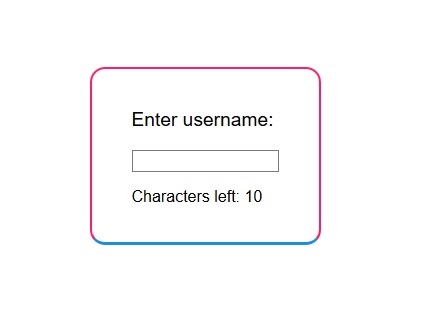
So last weeks we have been working in the “background” exploring some JavaScript libraries. As a group we chose to work with a library called Popmotion Pure. It’s an advanced animation library used mainly for animations. A lot of examples on the official website was very technical and was kind of hard to do own creations from the ground up. If I were to choose to use it as tool in the future for quick prototype, I wouldn’t. Mainly because it’s too advanced to use as a “quick” tool and requires the user the familiarize with it in order to know how to manipulate and create with it. Overall the animations from the library seems more directed towards smartphone or tablet design use. Not really suited for high-fidelity prototypes for the web of tomorrow.

Figure 1. Username input-field which highlights with color how many characters are left.

To round up the API-phase, I have got a feel for why it was necessary to try out digital tools and it’s important to know that different tools exist and can be used for various digital creations. As someone mentioned earlier in class: “it’s important to know they exist and what their capabilities is”.

A quick mention of a tool that I found very useful is github. It keeps track of versions of the project and by doing that gives a good overview of the progress. Members contribution is also clearly visible, which is a good thing since it can be hard to meet up sometimes and talk about what has been done. It adds value by keeping track of the revisions and so if a mistake has been made it can be reverted but also the ability to share the code and merge seamlessly is a big contributor to why it is a good tool.

For me as a person who is interested in technology but not in steep learning curves, if I were to use JavaScript in the future I would have to be careful with time. As it is an important resource in a project. I therefore have to asses how much time I have available for the project or prototype before I jump the gun on learning a new library and overall have to ask the question: is the library going to enhance the prototype in way that it is actually worth it? Is it actually worth investing the time in a library in order to create a prototype that is possibly high-fidelity (I wouldn’t imagine investing a lot of time in a library only to make a low-fidelity prototype, which can be made so much quicker with other digital tools…) or can you get away with using an other digital tool? I guess it depends on the technical skills of the person but also the type of project, budget, resources and so on. So highly individual from case to case.

Some quick thoughts of the article System Software for Ubiquitous Computing

The article is quite interesting although written in 2002 it discusses and outlines what ubiquitous computing is about. The main attention in the article is directed towards the software and it’s role as a interface between the physical and digital. Some concrete examples are made on what is ubiquitous and what isn’t. Authors make it clear that devices constructed to interact with other devices through a specialized protocol is not deemed to be in the category of ubiquitous or devices of spontaneous interoperation. The leap in developing advanced software for a more seamless operation between different types of devices is what should drive the future in ubiquitous computing, they argue.

The cost of relaying on software to solve issues is that tremendous amount of complexity is added. Not to mention the huge requirement on the technical aspect of the software to be reliable and safe. Since the article was published in 2002 many things have been developed, ubiquitous computing is often heard with/as the term IoT, or Internet of Things. This term seems more easier to understand and comprehend but basically they are the same. Devices can talk with each other and preferably without having to rely on pre-configured protocols limited to specific devices. IoT works seamless and effortless today. Where the driving factor behind implementation is because it can be done easily and why not?

It has come to a point where it’s so cheap to integrate it and so devices not really suited to be an IoT device becomes one and the usefulness or the advantage of being an IoT device can actually diminish. It rather drifts from being useful to being irritating and useless. What kind of possible value could for example a toaster give by being connected, or nowadays as we call it “smart”?

Assessing the functionality and how a toaster work we can come to the conclusion:

  1. You can’t toast bread remotely via the app because you have got to put some bread in the toaster
  2. You can’t start toasting the bread and leave. What useful can a person do on ~30 sec.
  3. Possible value is for people that is absolutely glued to their phone and who always is burning their toast as a result of that? Now they can get a greater control of the toaster?
A smart toaster

To summarize I think, transforming existing products into smart connected devices doesn’t always have benefits, Actually it can drift towards being a negative experience, not to mention the added layer of security and reliability that has to be considered.

CAD and 3D printing

Had a brief and short introduction in CAD software and 3d printing, the software demonstrated was Autodesk fusion 360 and prusaslicer. The workshop was very basic and we did a walkthrough on the functions of fusion 360. Since I have used fusion 360 to design 3d parts in the past this felt like a very easy workshop but the level set is understandable as this was something new for most students in class. I have no comments on the prusaslicer or the other half of the workshop as I didn’t attend it, plus I’m using the cura slicer to export the stl-file to 3d printable g-code. Basically the slicer is just a program for converting the file of the model into a file the 3D printer can use. So there is no special benefit in using one slicer over the other, I have been using cura for a while for my printer at home, so I’m sticking with it. The task can be done with any other slicer software just have to input the correct setting in order for it give good results. There was also a brief mention of the laser cutter and this was also a repetition on previous workshop we had. Since I got the first walkthrough with the laser cutter I’ve been using it more frequently for my projects.

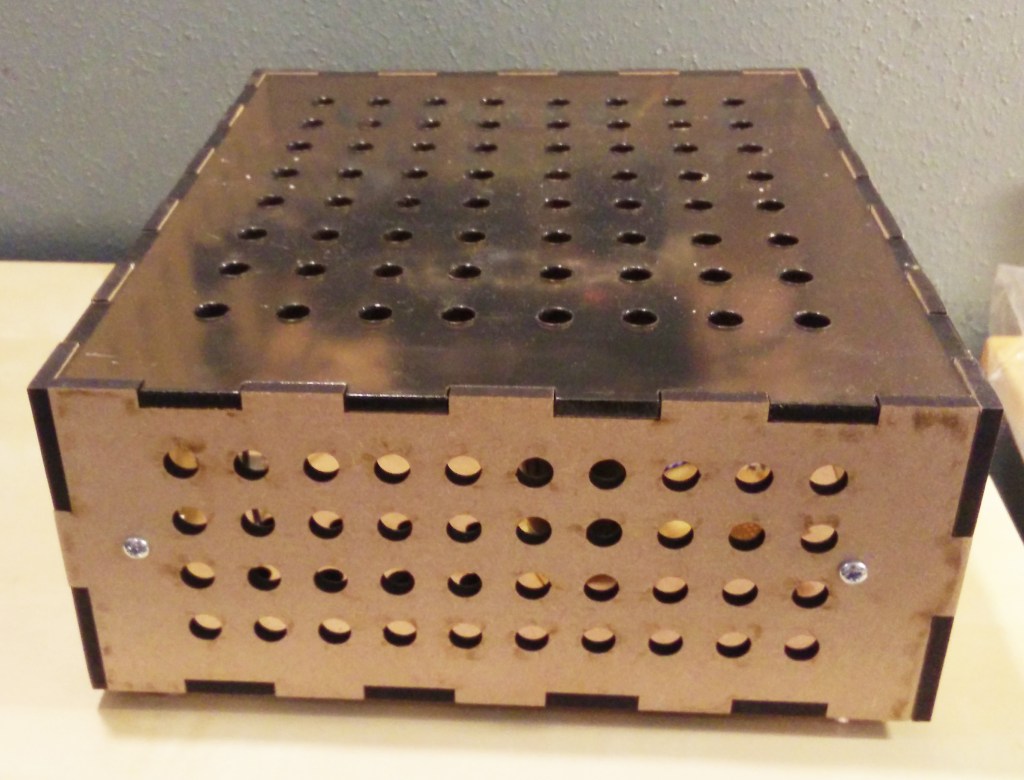
figure 1. Laser cut box with a plexiglas top cover

My latest project was to try out a high voltage bi-polar power supply I have designed. For that I generated a box with joints (a web based service generated the template to cut) so a minimal amount had to be spent on working on the box by hand and time and focus could be directed towards the technical aspect of the psu, testing and measuring the performance.

I have started to prioritize in developing my skills in illustrator so a the process goes faster and more fluid. Doing things by hand seems so cumbersome and inconvenient as the laser cutter is fast, precise and can cut/engrave different material. The only time investment from a prototype standpoint is on the drawing of the object itself in illustrator, the time the cutter uses is a very small percentage of the whole so it’s not really worth mentioning.

Just like my hobby projects, we can draw parallels with how the process would look in the course and in professional environment. The chain of process when I designed the psu was: drawing the circuit on paper, simulate the circuit in LTspice, build the circuit and box it and lastly test it with real world conditions. Repeat the loop if the design hasn’t achieved the desired outlined specifications.

Possibly if minor tweaks has to be done, the first/second step can be ignored and findings can be applied directly in the later stages, for example transistors seems to reach high temperature, solution is to add a bigger heat sink or a fan, which can be done directly in the build-stage.

Much similarity could be seen in the process of the prototype work in the course where we: sketch on paper, model the object in software, build/laser cut/print the model and lastly try it out. This would be one iteration of the prototype. How many times this iteration is repeated depends on if the goals of the design is reached and what kind of feedback we get from testing with users. I have not seen a good design being developed from one iteration and so it will be interesting to see how many iteration our prototype will go through in the project 2.

If i recall correctly most of my hobby prototypes sees 3 iterations before I’m completely satisfied with the end result. It seems that the right way to do it is to nail down the specifications from the start and not deviate from the specifications until testing has been done. First iteration will produce a prototype with high functionality but low visual physical appearance. It simply isn’t useful to spend time on the visuals if the objective of the prototype is to produce a function and vice versa if the main objective of the prototype is to communicate through the visual appearance.

Second iteration produces a refined functionality which was not achieved during first iteration or simply tweaks for the better outcome as well as high level of visual appearance. The third iteration is tweaking the functionality to final and definite values with some improvements on the visual appearance if needed.

“It’s not rocket science”…user testing

Had an interesting lecture about user testing. This is something in my field of interest since it’s describing a phase in the design process that is more about the practical way of conducting things, and in this case how to test a design/prototype with users. The outcome of the activity is to analyze the data and implement the result in the design. The core question of the lecture was “when, why and how?” we do user testing. There were also a brief mention of data and how to use it the right way..

I recall touching on the subject of user testing in the course methods 1, were I critiqued the way we worked as a group in order to solve our usability issues. Basically to shorten the story we hadn’t got the opportunity to do things the right way. One method to do it (and which is mathematically calculated) is to test the design with 5 users during 3 different stages. Jakob Nielsen goes through the essentials in the article “Why You Only Need to Test with 5 Users”, which is an very interesting read and highly related to the field of user testing. Using that way will come as close it can to achieving 100% coverage, although there is always something to uncover as no design is perfect, this method provides the best cost-to-coverage ratio. As we are in an educational environment and no actual money is being spent on user testing, rather time, there will be no issues gathering more participants for the testing if it’s needed.

I’m curios to see if the formula is accurate enough were it’s stated that 85% of the problems will be uncovered in the first stage of user testing. The second testing will uncover 15% and the third one 2%. During each stage and refinement of the design there is bound to be a new introduction of some errors in the design by the designers but overall it’s an interesting claim which I will keep in mind when move to the testing phase in project 2.

Nielsen doesn’t specify which methods is used, maybe it is so that depending on which method is used and which setting the method is being used in will affect the success rate and possible errors uncovered? This is an interesting relation and something I will try to find some answers to during the user testing phase in project 2.

The lecture also brought up briefly some methods on how user testing can be done. Observation and think aloud is methods I have used before with good result. The methods were used in a project to analyze and format the user interface of a website. The end goal was to see how much more efficiently the website could be and improved in the overall experience.

Video analysis is a method I haven’t got the opportunity to use yet, maybe it will come in use this project? I have always looked at what’s the best method for the project and issue at hand and how efficiently data can be extracted. Take the example above with testing on a website, using video analysis seems cumbersome and time consuming. The think aloud method is more efficient and time-effective. It has more benefits over video analysis in this example. We learned that so much thoughts and opinions are in the mind of a person when browsing on an interactive web page. So it feels more appropriate to voice those thoughts out loud. And also voice them immediately than to continue do tasks and talk about possible issues and snags in the design in the end of the session. Most likely if the users have to remember and think back on all the faults, there will be some loss in the level of details in remembering all the errors. That’s why I really favor the think aloud process were the user thoughts and critic is unfiltered and voiced as the user is doing the tasks.

Experience prototyping

Some interesting findings in the article, Experience prototyping by Marion Buchenau and Jane Fulton Suri. The content and main objective of the paper is to explain the method of experience prototyping. The article becomes increasingly engaging as it digs deeper into what it really means.

As experience is something very dynamic and complex and interwoven with social setting, time, place and other factors. It becomes more sophisticated to grasp the term and sort out how to define it. Buchenau and Suri states that the look and feel of an product is what really is concrete experience of using an artifact. The experience is not only limited to that but can be seen as how the functions of an artifact serves in user’s life. From a design perspective this sounds complex enough, but at the same time very interesting. How and when does a product/system become “useless”, to whom (demographic) and why?

The writers continues to press the issue that the experience in the term “experience prototyping” is the method which allows the designers, clients or users to “experience it themselves instead of witnessing a demo or someone else’s experience”. An argument for understanding the experiential qualities is to subjectively experience it…

A point in why it has become important nowadays is that interactions and systems which is being designed are becoming increasingly complex. As designer a holistic approach is preferred as the artifact must take into account the whole experience and not just the part in which it acts. Not only will it become essential to ask: is this component working as it should? Does it give the experience and usability as it should? Rather questions should be framed: How does this environment feel when the component is present and working? How are the dynamics of the environment changing and how does it add to usability in the environment?

From a design perspective, the holistic approach becomes. naturally in our time, a more complex issue but a very necessary one. Designing sustainable and robust interactions and systems require a deeper learning of the whole. So by isolating individual components and adding them to the greater system without taking into the account of what the needs or interactions are within that system, are bound to perform bad or quickly become useless.

The writers are adding to the argument by summarizing that multiple disciplines are needed to cooperate in order to solve design problems of today. Each and everyone of the groups have different way of understanding and solving the issue. It demonstrates how complex the view of a system or an interaction has become and the magnitude of knowledge it requires to solve those problems.

To voice some issues there is in experience prototyping, one can say that the designer is being put into the situation of using something. Something that usually the designer is not expert in. This isn’t always reflected in the result of experience whereas a professional could use something much more efficiently and proficient whereas a novice wouldn’t really gain the full experience. The writers discuss this in the paper and as a solution, other stakeholders should also be included to share their domain of knowledge and experience in the design. Because in the end the design is to be used by other people than the designers themselves so it becomes a natural thing to include the “expert” group of people that really represent the true requirement of the interaction and design.

Project 1 feedback and conclusion

This entry will focus on summing up the result of the project and try to reflect about the feedback we got from Johannes and also the other students in class. Last time I wrote about the project we had roughly one day left to work on it (Thursday). As it was the last day we had no time dwell deeper into the design opportunities although following the schedule provided there was time set for reanalyzing the result from Wednesday or previous iteration. We as a group was simply a bit behind and felt the need to stop with the generation of information and start with the presentation work.

On Friday we had our presentation, although we had pinpointed important findings and insights during the week, we had issues in conveying them in a structured and linear way. Feedback we got was that it was slightly confusing and it was hard to follow on how we got to the presented insights. Also the little to no mention was put on to describe how our prototypes evolved and how we worked to provoke situations in order to gain insights.

A certain discrepancy is present between the work that was produced and the work that was presented. I guess an effective way to solve that issue is to work on presentation slides every production day and not on the last day. Although this project has felt very forced and stressed, it’s not impossible to produce great end result but I feel overall that an extra day would make a difference.

One of the most valuable skills I learned in this short time was how to “provoke” a set of rules or situation. I always thought that best result was achieved by provoking in the direction of positivity, e.g strengthening the arguments of a setting. But I learned that we can confirm a negative aspect by trying it out, in order to strengthen (or weaken) the counter statement.

To take a real example we had during our work was: How can we add more of the value intimacy in a therapy session. So we would brainstorm around arguments that would increase the value of intimacy. Not really taking into account to try out argument that would drift away from positive value. For example: What would happen with the value intimacy if the parts communicated through text messaging? We learned that by trying out this we actually added more value and insights to the established way of doing a therapy session, face to face.

As to conclude, the core of prototyping is to try out different stances in order to confirm said statement or thoughts. By doing that uncertainties gets clarified and valuable insights are created and subsequently it will back up the work and build up a strong case for a prototype design.

Another technique I have to keep on trying and evaluate more if it fits me and my way of working is the short and rapid iterations. I guess that’s why this project was so short? In order to focus and intensify energy put into a project in a short period of time. Someway now that I’m thinking of it, it goes hand in hand with prototyping cycles. Since the knowledge is not permanent but constantly keeps evolving with insights being added or removed.

I can understand why the process can or should be done in a short time but at the same there might be a risk of not grasping the subject wholeheartedly. As a designer I would guess a strange and unfamiliar topic that is complex, will require longer iterations and therefore more time in order to complete? More time for the project will yield more time for exploration and dwelling deeper into the complex qualities of the subject. The sacrifice is that it takes longer production time to complete, not really in sync with how things are expected to be done in today’s society?

Project 1, the first three days…

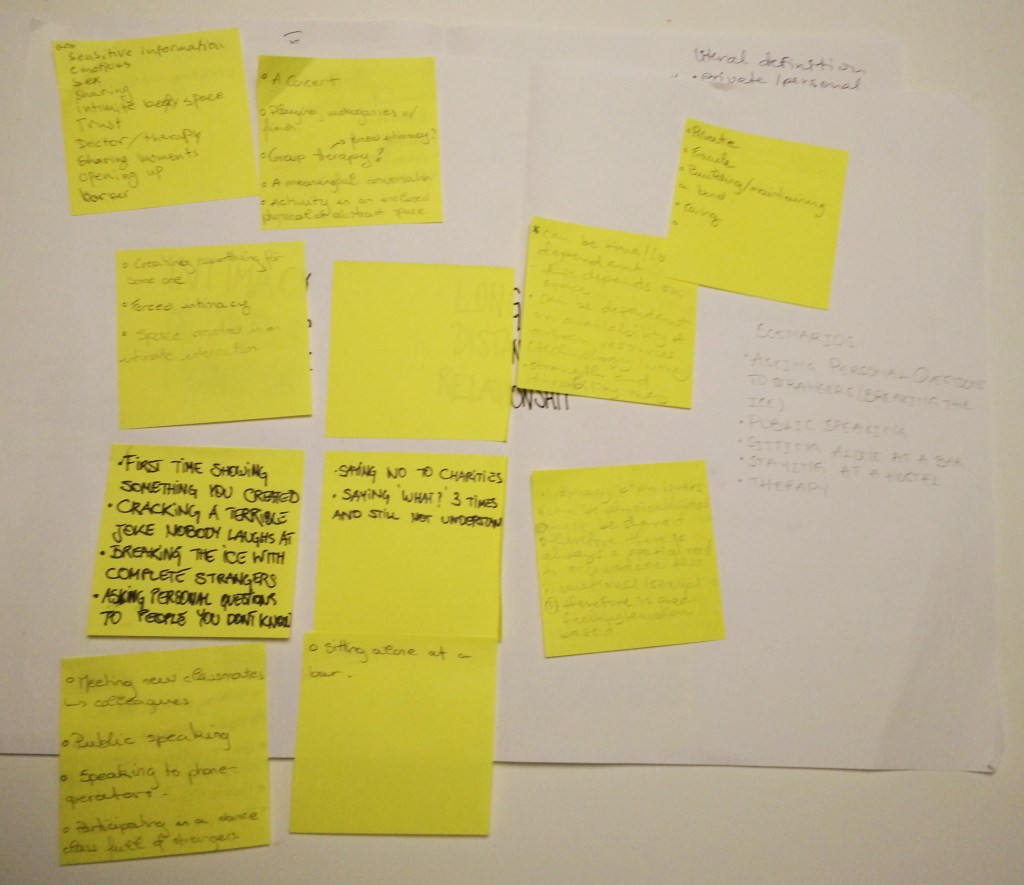
Started a new project with a set of new colleges. We had the project introduction on Monday which got us officially started on the project with some brainstorming. Intimacy is our theme, which is a very broad theme but I wouldn’t argue that the other themes are any easier. Since this is a short collaboration(4 days with presentation on day 5), it’s all about iterating and doing quick and fast prototypes. The interpretation of the the theme is up to us as a group to decide what we want to declare as a context.

After some brainstorming and thinking of the subject we landed on “Therapy session”. This context was birthed out of the intimate feeling of sharing your feelings with others. Actually sharing feelings with others in general is an intimate thing for most people so we wanted to give it a limited setting and so we chose therapy session, as in a session with a therapist/psychologist.

Figure 1. Brainstorming on the theme intimate

So on Monday the core objective was to hone in on some specifics and document it, on Tuesday it was time test out some contexts and try to provoke the situation in order to understand it better. This was an important and crucial step because it would deepen our understanding in the issue. Unfortunately we focused on other things like spending to much time on exploring other context/setting (at the end we decided to go with the therapy session). So we were one day behind on our schedule.

Figure 2. Some work from Monday and Tuesday session.

On Wednesday session we got some guiding by Johannes and it helped to rethink in which way we wanted to take our project and how to test out our ideas. Taking the core concept of a therapy session were one person is a professional and actively listens and asks questions, and the other person who tries to unpack their issue/problem. The core in itself can’t be really experimented on, but the surroundings and the setting can.

We started with the communication aspect and tried out what it would be if communication was done differently. We tried texting, video messaging and face to face communication in order to reenact communication on different levels and intimacy was observed.

We also wanted to try out different interior setting where the session is being held and also the physical distance between the therapist and the client. For that we did a paper prototype but it didn’t give us any deeper insights. We might instead try out some role playing where we try to find the optimal distance between the two people and maximal value of intimacy.

Figure 3. A quick prototype, with a sofa, table and a chair.

What knowledge I take away these three days of group work is following:

  1. It’s hard to bootstrap a quick project in such a short time without knowing our teammates properly. Everyone is on a different skill level and so I believe we could save in some valuable time in grouping up with people we know or have been in group before with (e.g. video-prototyping groups).
  2. It’s not expected to be super precise end result rather the key learning is iterations, ideation and quick prototypes. It can be hard for students (for us) to define the level of end result. Most students strive to do as a good job as possible and sometimes we maybe strive to do more than required?
  3. Coaching and talking to other groups is good practice to develop and ignite different point of views. We often got stuck as group and had to move on due to time. Therefore some aspects/ideas were abandoned rather quickly. On Wednesday when we got to meet everyone again was refreshing and kind of rekindled the focus at developing progression. Hearing how different students dealt with problems and how they solved it inspired and reminded me and the group to think differently and keep an open mind to exploring different solutions.

workshop 3 & week 3 recap

Fridays workshop was a continuance on the workshop on Thursday. We concluded that the prototype didn’t add any value to the specific game (ping pong) and so the workshop was to re-develop the controller.

So we as a group decided that the pedal controller didn’t work as intended. We wanted to create a controller that could be controlled by using your feet and balance. Since we didn’t have much time last session we didn’t incorporate the “balance-function”. Therefore we only did a simple up/down controller. We came to the conclusion that the design was ok, but the functionality was poor. The controller required to much force and was sized to bigger shoe size.

The focus was to try to fix all these issues but most importantly get the functionality to work as we intended. To reach that goal the sensitivity and precision had to be increased in the pedal. Now as quick prototype we used bunched up some copper tape into a dense ball. This acted as the switch which made connection between the two copper strips which in turn were hooked up via wire leads to arduino, completing the circuit.

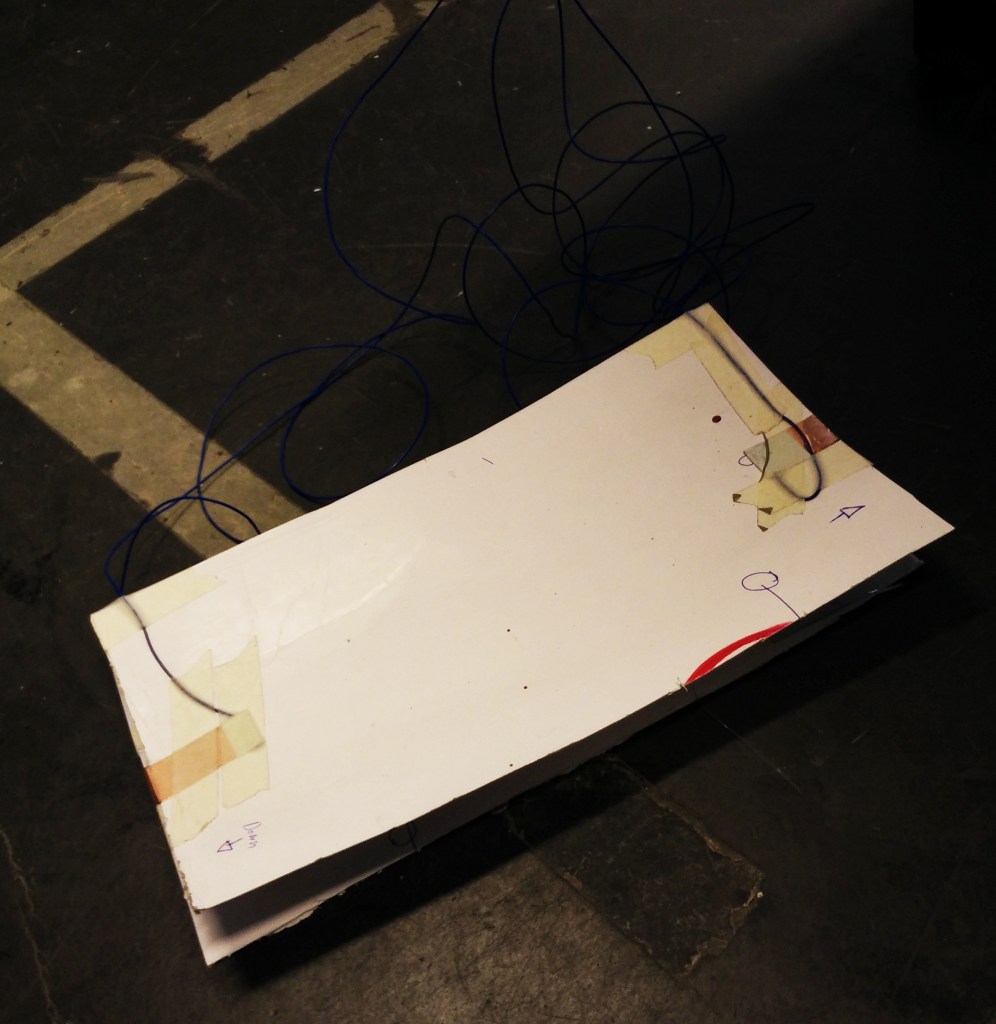
Figure 1. The core of the foot controller, a plastic foam.

The controller consisted of two pieces of paper between a 1,5-2 cm thick plastic foam. Which was surprisingly resilient against wear and tear. There was nothing wrong with the foam or the structural integrity of the controller, only the function had to be tweaked in order to increase the precision. This value had to be carefully investigated and tuned. A controller has a game to be matched against. The sensitivity and response of an controller is key in order to have a fluid and interactive experience but we, as previously mentioned, felt we were way below the acceptable level for both areas.

As the controller was used multiple times, the copper ball got more and more squished together into a denser ball, yielding a even worse connection or no connection at all. So we started to take apart and explore the role of the ball and try to redo it to something that isn’t in the risk of being defective once it has been used a couple of times.

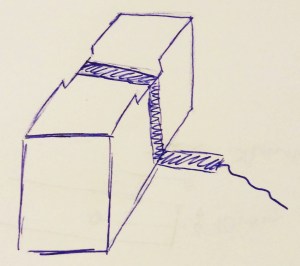
Figure 2. Sketch of the redesign.

The toe and heel part was replaced with object in figure 2, rest of the plastic foam was used a center piece to put all the weight of the foot/body. The sides of the object are a little bit higher than the center part where the copper strip is located mimicking a button.

When implemented it seemed to work a bit better than the first revision. Still some amount of force had to be applied but not as much as before. The precision can be worked on but I don’t think it’s possible to improve it by making it with foam/paper/copper. The controller has either a connection or not, so the travel is a bit unimportant for the user to think about. The user will always use more force than needed just to be safe that the controller makes a connection. Inevitably pushing the design back to square one, but so far we know that the force applied to it can be adjusted in a limited. Replacing the plastic foam and experimenting with different material could be a solution for future development.

As an approach in future (and this comes also with a bit experience) is to collect and sample a variety of different materials available and just play around with their physical attributes. In a way it will give more understanding about the material and the prototype can be developed with a bit more certainty.

This week has introduced a mix of static and dynamic work. With the coding exercises I’m limited to explore the digital possibilities of a animation library. Other than showing of interesting animated elements, I don’t see so much use of the coding in the physical workshop we had this week. Maybe if a game or some digital prototype has to be developed then maybe it will be useful?

Workshop 3

Workshop 3 consisted of a exercise with the arduino microcontroller. The task was to build a interactive keypad/controller for a random game. From the start we thought about some kind of controller where the person has to use the whole body or the balance to control up/down/left/right. But as we split in groups of 2 we downsized our plans to a simple foot pedal which is controlled by pressing with toes and heel.

Figure 1. Our simple foot controller

The controller worked barely as intended because it required a lot of force to register a connection. It was calibrated to work with heavier/stronger people. It was cumbersome to use by others who haven´t got the same “pressing power” and still if they had it would not be a viable controller.

The game used to test the controller with, was the classic ping pong game. Although an easy game to understand and play it became hard play with the controller. As the game is fast-paced and requires the player to move the racket up and down on the screen, it gets increasingly frustrated as some level of precision also has to be applied in order to hit the ball.

So, as to help purely interactive with the movement, the pedal does the opposite. Adding frustration, loss in interest and taking away the joyous and fun experience of ping pong. What can be done in order to flip the negative experience of the controller and add (positive) value to ping pong? Maybe the controller can be tuned to be more sensitive and thus reduce the amount of force one has to apply to the pads.

Thinking of the interaction of a fast paced game, to use the hands as a means to control the pad is something that comes naturally to mind as we can do fast and precise movements without thinking to much about it. It someway seems a bit disconnected to use your foot to control something that by nature is controlled by hands. As a conclusion maybe another game that involves the correct interaction to heavy pressing with the foot would be perceived more positive and give good experience.

Matching the prototype to the right end use seems like a obvious thing to do, however we thought about how we could implement different movements in the controller and after that thought about what game to use. So the execution could have been better but I believe we can still salvage the controller by using a more suitable game/interaction.

Not only our group, other groups seemed to struggle with precision in motion as well. Which makes me think about the relation between what’s possible to do with a low-fi prototype and the level of interactivity. Are all low-fi prototypes limited to their assigned (low) interactive value or can it be elevated somehow?

API Lab thoughts

So the API lab has officially started on Monday. Not much information on Monday other than setting up git hub repository/connecting computers to it and choosing a library. My group and I have chosen to research the Popmotion library which is an animation library.

The official goal for this part of the course is to research->explore->prototype and finally report the findings. Like some students in class, I’m wondering how deep I should submerge myself in coding and JavaScript. As a means for creating quick prototypes (low fidelity) I feel that this tool will be cumbersome because it’s a highly technical one, maybe more directed towards high fidelity? A faster way to do graphics for me is to model/animate them in some 3D/CAD-software. Basically drag-and-drop type of software and I don’t prioritize them because they can be used with a lower skill level but it’s because it’s fast and delivers enough to showcase a prototype.

In previously mentioned posts I was explaining on why I like to work with low fidelity prototypes and in an iterative process. Spending less effort on time-consuming practices will free up more time for important tasks.

Now that’s not say that I would like to do everything fast and haphazardly but to focus on what is important in the process. As I believe prototyping is a part of a bigger process. However at some point a high fidelity prototype has to be made in order to deepen the understanding and a substantial amount of time has to be invested, but at that point I believe that serious skills in programming is going to be needed to create the prototype.

The API lab will introduce some exploring in other libraries and they can make working with code a bit faster. Depending on the library the model/code already exist and is accessible a bit faster then coding out every function and method manually. So as means of time-efficient tool, coding becomes a bit of a smoother tool but there is still whole lot of tools to use as designer in order to showcase digital interactivity. I just have to research which tool is the “best” and suits me in a way that it erases boundaries and makes it a seamlessly extension of my creativity.

Recap week 2

This week started off a bit theory heavy with a lecture in “Dissecting prototypes” and programming in Tuesday. Other than that most of the week was filled with group work in video prototyping.

The prototype lecture in Monday was interesting, containing rich information about the subject but it also pinpoints and clarifies some thoughts about the principles about prototyping and the qualities it possess. What I apprehend, the 3 qualities of prototype (Tenuos, Material and Present) has wide usability and each prototype can be made with a strong (or week) emphasis depending on what is sought after. For example in material quality, the prototype can call for feel, strength, color and so on. If the design specification states carbon fiber as material due to it’s tensile strength, can the prototype work or be sufficient with fiberglass as material? Most certainly not if it’s going to perform in strength but as for qualities like feel and color it can pass.

What I’m trying to express as a closing thought is that, a certain thought has to be given to what the prototype is going to be used as and how and by who. I’m much inclined with the idea of iterative design so I’m leaning towards low fidelity, low cost prototypes that can be scraped or redone without hassle. A robust design has to be proven by going through iterations of failures in order to capture the research data required for a “successful” design. That is why I believe that quick iterations of the prototype can generate increasing knowledge and yield better refinement for each sprint, inching one step closer to the final design specification.

Workshop 2 Video prototype feedback

Had a nice workshop 31/1 were we got to watch and compare other students video prototypes. Which was interesting and enlightening. Some of the critique we got on our video was not surprising and was most of the issues I kind of suspected and mentioned in my post 30/1. The social context and camera technique was the two major points. We could have filmed outside on a bus bench instead of inside a building, that would make it more efficient and save some scenes in the process. The camera technique could also be better and is something that needs to be learned by doing (and experimenting). So hopefully we get some more opportunities to better our skills.

Beyond that I’m still reflecting on the relation between the level of the details of the prototype and the amount of energy put in on the production of the video and how to balance those two things. After watching all of the groups it leans towards being complex issue with no real straight yes or no answer. What I perceived on the viewing was that, if the prototype is immediately recognizable in function and use, higher level of detail is redundant. By achieving this goal a lesser amount of scenes have to be made in order to explain the prototype. It’s maybe easier said then done, but it’s a goal in itself for most designer when creating. To make a design appear natural, easy to use and self explanatory and should not inflict any doubt in the mind of a user.

When applying this approach to our video, we see the value in the end of the video where the characters got to interact with each other by playing a game together. Because the function of the device being delayed so long and not being apparent or self explanatory. The information being communicated has to have more of a background story (more scenes and longer video) to it on order for the viewer to understand the prototype/device.

Summary about arduino and electronics lectures

The lectures we had was pretty basic and entry level. The first one being a walk through what a micro-controller (arduino) is and it’s physical capabilities. Some basic knowledge about electronics was also shared. Resistor, led, transistor, breadboard, jumper wires and miscellaneous stuff associated in the starter kit. So I felt a bit ahead in that area as I have used the arduino in the past to control a CNC machine and also as a controller for a relay based attenuator. Both of which were successful projects.

I need to sharpen my skills in coding department of the arduino, usually I get my things to work and since I tend to build stuff with emphasis on physical (analogue) result, I down-prioritize the development in my coding skills. So I need to think about that in the future.

The electronic and mechanic hardware is really my field but sometimes the design requires some logic and that’s were arduino doe’s an excellent job. It’s easy to use, has a small footprint and can fulfill most requirements. I always try to push hardware to it’s absolute limit before adding more complexity. I follow the mantra, that sometimes, less is more.

I’m expecting to be challenged in this course but I think that I actively have to chase and set a high goal for myself as I don’t believe the (course syllabus) bar is going to be set on an advanced level.

Video prototyping finalization and thoughts

Today was the last day to work on the video prototype and our “flex device”. We continued to use the paper screens we made yesterday as the printers in university still were offline and the paper ones mediate the message in a “okay”-way. Now it was time to actually do some filming of the prototype and try to show the user value.

We wanted to convey a device that will inspire people to interact with each other, although it’s not a usual behavior (to go up to a stranger and ask if they want to play a game on a device) but we thought that everyone could enjoy and bond over a game, especially the younger generation.

Figure 1 from video prototype session 28/1 shows 2 person waiting for something and are bored by doing that. One person get an idea to use the flex-device to do a social thing with the other person. The user value is a device that inspire interactivity between 2 people in any social context. Although it can be discussed how much practical use it has in real life we firmly believe this exercise was to get some experience in doing video prototypes and so not much thought was given to make the logic of the device waterproof.

As can be seen on this link of our video prototype, we are missing or are a bit weak in communicating target groups and also the user value could be a little more refined and highlighted. As the prototype is low-fi, a great amount of pressure was set on acting out the values it can represent. We found it as an interesting relation.

Other issues that could be dealt with better is, doing a time schedule, choosing a filming location and using correct camera techniques. These things would yield in a more professional looking video. Especially filming location could set the social setting for video and thus wouldn’t it be necessary to imply or explain it in the video. By doing this things not only will the video be time efficient but also the actors will have less burden to perform and the values will be easier to show.

Building a stepping stool and video prototyping session

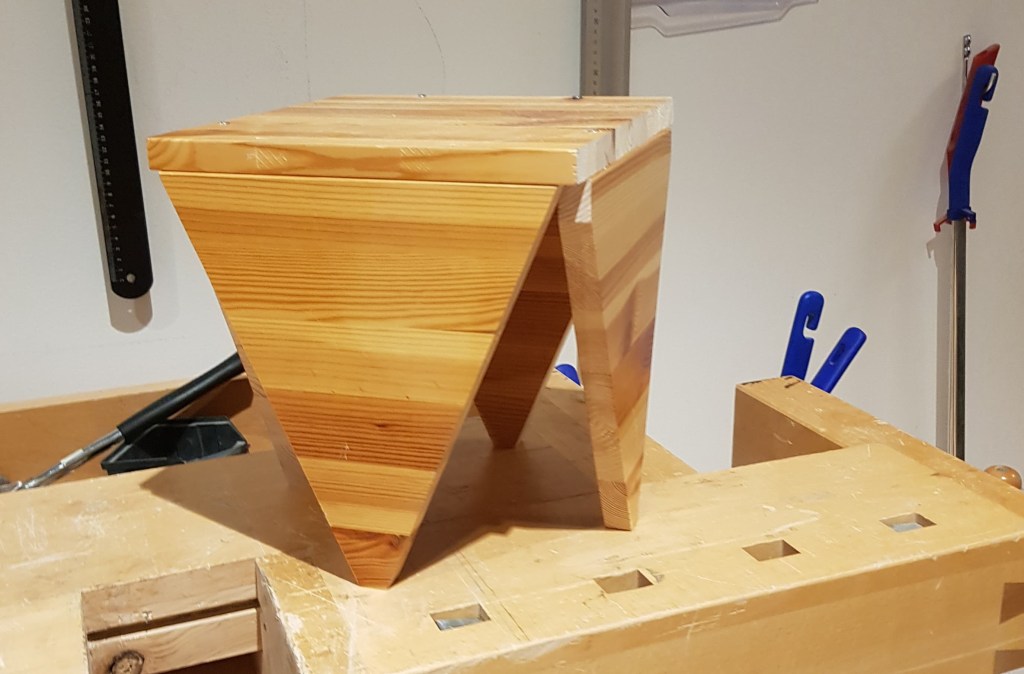
Today was a busy day, ended the workshop tour and exercise by getting to know more tools and finishing the stepping stool from last week. I’m pleased by the visual design of it, but it performed badly in the functionality test (the legs broke off). I’m certain that with a little more time on the engineering part the stool should hold a normal person. Some kind of balance is always important when designing something. We tried to think a little bit different and challenge the usual design by doing it a bit differently with sacrificing structural integrity as a result. So a note for the future would be to balance different areas out more evenly and ultimately achieve the clients demand for the design.

Figure 1. Stepping stool with the triangle-shaped legs

The evening was reserved for video prototyping. As the whole university’s WiFi was down, we couldn’t print out the necessary images for our “flex-Device”. We tried to print it via an USB-stick with no success, as a little remainder one truly appreciate devices that actually CAN work without any WiFi access.

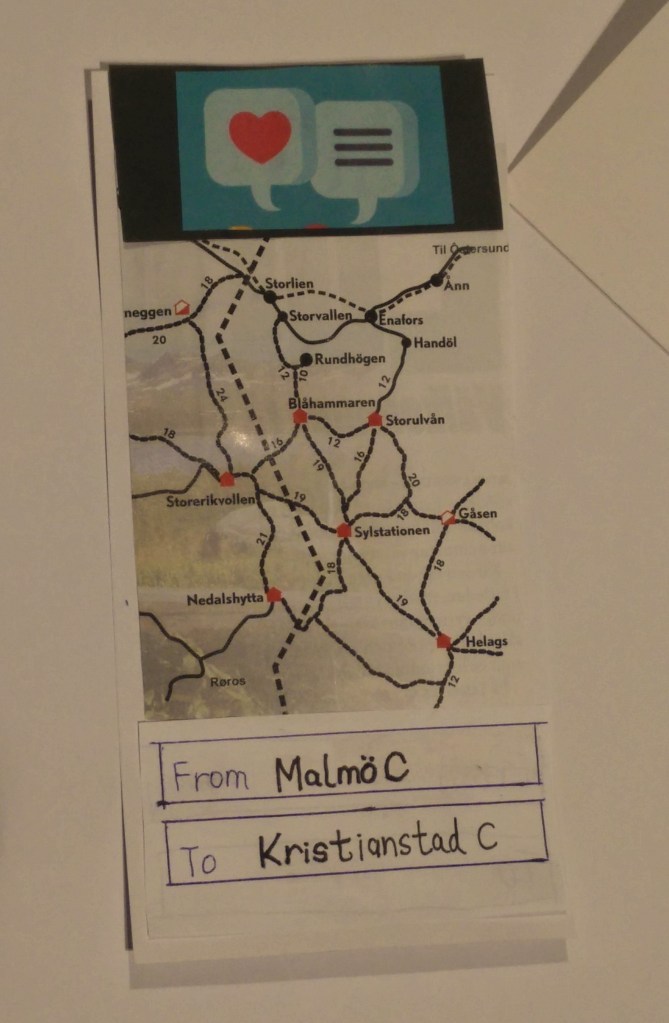
We had no choice than to use the time to do some kind of a arts and crafts. As we were cutting and gluing the screen together we actually got some time to try out the prototype for the first time. As we did it we realized there has to be at least 2 more scenes in the video to connect the logic of the situation. Somehow using the prototype albeit in a very crude form got us thinking about the logic of it. A sort of prototyping-sense was created to it in understanding, as I was holding it physically. Something I couldn’t imagine or think of before I had the prototype.

Figure 2. The First screen showing an app with travel info
Figure 3. Chaos on the table as we try to find valuable graphics

Video prototype session 28/1

Got some quality time with the group. Most of the core settings are set and the storyboard is made. Next step would be filming and iterate that process a couple of times until we are satisfied with the outcome. Key focus should be on storytelling, setting the context and to mediate the user value in a efficient way.

With that said, we hope that the acting/video will represent what we actual had in our mind. Since none of us in the group have done anything like this before, we proceed to this step with curiosity and and somewhat creative reservation.

Figure 1. Storyboard for the video prototype

I guess the experience in filming and creating content will aid in telling the story in a efficient way. Right now we are not taking any “chances”. More on that topic when the video is created.

A thought I had been thinking of; is there any relation between the design fidelity of the prototype and the production quality of a video prototype? Do people tend to put more effort in bringing up (or down) the video to the same level as the prototype or does it have no relation at all as long as the video convey the core message? Do designers think of what is possible to do in the world of video editing and create from that or are there no creative limitations in the pursuit of communicating the message of the prototype?

First week recap

A lot of interesting information have been presented. Prototyping isn’t an isolated task, it is joined and paired up in different ways with several elements. Depending on how advanced the outcome should be, the level of complexity can rise very fast. But the point is that a prototype should be made in an efficent matter to embody thought, ideas and functionality into something physical.

So far this past week we had theory (introduction) about prototyping. A guide through the wood/metal-shop and the associated tools, as well as introduction to the arduino micro controller and programming in javascript.

Two assignments have also been presented, on group assignment where we should do a video prototype based around one theme. The main objective and outcome of the exercise, I would guess is to train in setting context, time efficiency and mediate a story. Also, a bunch of technical stuff which can be learned-by-doing.

Other assignment is an individual one. Netflix gesture exercise, in which we should do a short video prototype. Here I would guess the main objective is to learn to think creatively and also kickstart the course by doing a short assignment.

So far, since I’m quite handy in the mechanical part of doing prototypes my interest is directed towards the theory of why and when to use a specific “tool” and how to choose the right one.

Featured

Sketching and Video prototype

21/1 we had a workshop in why we sketch and do video prototypes and why it is important. The workshop was followed with some practical tasks and disscussion about a couple of video prototypes.

Figure 1. Upside down portrait to learn to focus on “seeing” the sketching rather than the object.
Figure 2. A five frame sketch in what I do in the morning.

Prototypes are important because as a designer we can quickly embody our ideas into tangible physical things. A great way to actually show what your mind is thinking, wheater it is a sketch or a video.

Since we are trying to make something out of what our mind has thought of, it can’t always be that easy to replicate it into something that is a exactly a one-to-one copy. Meaning: one can always reflect and iterate on a design.

Why that is important, I believe, has to do with the fact that we are living in context where things quickly change and no design is permanent. As peoples habit change so does our need for different interaction and design.

The interesting part is when a design/interactivity becomes obsolete and why? Can a design be made future proof?

Featured

21/1 First Impression

Introduction to prototyping and first workshop day finished. Nothing to crayz information-wise. Softstart with the intro day 20/1. Workshop 21/1 provided some more information and exersices. All of my blogg post will follow a specific style where I try to answer on:

-What?

A short description of the context, usually a couple of sentences.

-Why?

Answers are formulated by answering “why” and further exploring why someting is interesting or surprising.

-…and then?

Deeper reflection should be explained and discussed.

But also anything in between can occur, of course information tied to the course.

Featured

New course

A new course has started; “Interaction Design: Prototyping, 15 credits”. A new category is started for this porpuse. Simply called “Prototyping”. Course will run from 20/1 to 27/3. I’m aiming to update my journal at least twice a week.